Get ready for Lumen® SD‑WAN with Versa Networks
As we set up your Lumen SD‑WAN with Versa Networks service, use this guide to follow the process step by step and to know where we'll need your help.
By partnering with Lumen for your SD‑WAN solution, you get all the benefits SD‑WAN brings as a technology without the overhead of managing, configuring, and provisioning on a manual basis.
Lumen Managed SD‑WAN is built on a toolset from Versa, our partner company, and is delivered as a managed service. Lumen SD‑WAN with Versa Networks is an enterprise network created, defined, and controlled by a central software platform powered by Versa Networks that remotely configures and monitors physical and virtual customer‑premises equipment (CPE) connected by a mix of network technologies including Internet broadband, wireless, and MPLS.
Lumen supports the initial configuration of the service, along with monitoring and managing events associated with the SD‑WAN appliance and circuit availability.
Benefits of your SD-WAN solution
Cost savings: the ability to intelligently use lower cost Internet connections to achieve MPLS-like QoS provides a greater return on investment. Also, all bandwidth is utilized, so bandwidth per dollar costs is lower. SD-WAN also utilizes lower cost common off the shelf (COTS) x86 hardware.
Application-aware routing: traffic path can be chosen based on application and/or performance of the connection in near real-time. We measure packet loss, latency, and jitter on every path for the best route possible.
Visibility: SD-WAN services are centrally managed via one powerful interface. Common traffic prioritization rules/templates can be applied across locations, reducing provisioning time and risk for errors. SD-WAN provides complete network visibility and real-time reporting at the application level.
Simplicity: SD-WAN uses a remote configuration deployment method using standardized non-proprietary hardware and requires no on-site resources to complete. This means that the SD-WAN device connects home to obtain its configuration upon security validation once it’s powered on. Provisioning the service from open box to active network can be done in minutes.
Bundled and managed connectivity: transport options can include MPLS, Internet, Wireless (LTE), and Cable from Lumen or other carriers in which Lumen has agreements. All transport provided by Lumen includes a single point of contact to resolve any connectivity issues.
Scheduled activation for managed SD-WAN services
Scheduled activations for SD-WAN service(s) require a two-step process: installing equipment (phase 1) and scheduling the activation (phase 2). If your order includes on-site installation, expect a site visit by a Lumen technician to install and test the equipment before the scheduled activation event.
Your service-delivery partners
We understand the service-delivery process can be complicated and are committed to making it easy for you by communicating with you every step of the way and giving you visibility to manage your orders.
- We partner with you to make sure we have all the correct information to prepare your service for accurate and timely delivery.
- We validate the network resources necessary to meet your requirements and determine when we can complete your activation.
- We provision, configure, and test our network to enable proper function and performance of your services.
- We email you as your order progresses through the service delivery process, and we are here to assist you every step of the way.
- Depending on the type of SD-WAN service you ordered, you can connect your equipment and activate your service or we work with you to schedule a coordinated activation.
Customer care manager (CCM)
Your CCM ensures all related services, including internet, MPLS, or broadband are delivered on-time and in coordination with your SD-WAN project manager. Your acknowledgement letter includes contact information for your CCM: name, phone number, and email. Your CCM assists you with any questions about your order, keeps you informed of the status every step of the way, and acts as your advocate. They are your contact throughout the lifecycle of your order and manages your order from when your order is submitted to when you accept your new service, and they communicate with you at key milestones and updates. If you have questions about your order, please contact your CCM.
SD-WAN project manager (SD-WAN PM)
Your SD-WAN PM enters the process when the first location in the project scope reaches implementation readiness status. This occurs when IP information is available from all supporting circuits present in the SD-WAN network. The SD-WAN PM schedules a kickoff call with you to review the implementation process and coordinates communication with your CCM regarding the remaining locations in the project scope. Your SDWAN PM helps you with any questions about your SD-WAN order, keeps you informed of the status every step of the way, works closely with your CCM and various SD-WAN engineering teams responsible for implementing your SD-WAN services. Once your services are ready to be activated, the SD-WAN PM contacts you to schedule the activation for all locations.
Technical design engineer (TDE)
Your TDE interviews you (or your IT contact) to validate that we have all the necessary technical information to properly install your service. This is our opportunity to ensure we accurately confirm details that impact your final configurations.
Examples of the information we will gather include:
- Firewall (e.g., permit/deny certain traffic based on IP and/or protocol)
- URL filtering (e.g., blocking certain websites or website genres)
- Ports for WAN and LAN (How many? Port number?)
- WAN routing
- LAN routing
- VLAN requirements
- QoS
SD-WAN build team
Once the technical details are gathered by the TDE team, the SDWAN build team
- reviews the TDE workbook
- builds the configuration template on the Versa Director
- creates a new device on the Versa Director
SD-WAN activations team
Once the build is complete, the activation will be scheduled with an SD-WAN activations engineer. It is important to note that the related transport circuits must be ready in order to proceed with the scheduled activation and ensure configurations are complete.
During the activation call, the Lumen activations technician works with your technical contact to onboard the SD-WAN appliance, validates configurations on the SD-WAN appliance, and helps in the testing process.
What to expect during the process
- Once IP addresses are assigned to the transport circuit, we will review your order for accuracy and hand it off to your SD-WAN PM for tracking and communication.
- Your order is then assigned to the technical design engineer (TDE) who worked with you to complete the SD-WAN workbook.
- The technical design engineer (TDE) creates an initial configuration for the SD-WAN appliance for onboarding once device placement is finalized and IPs are assigned. Standard shipments arrive at your site within 3–5 business days. If you are activating a virtual instance of SD WAN, no device will be shipped.
- The technical design engineer (TDE) sends the final workbook to you for approval. We need your approval before we can complete the design phase.
- Once the device is on site and the configurations are ready, we begin planning for the scheduled activation events.
- The SD-WAN PM calls you to discuss possible activation dates/times for your network solution. It is important to identify any primary sites (that you want us to activate first).
- The SD-WAN PM schedules the phase-1 activation to establish equipment and circuit connectivity only. Our engineer contacts you to verify communication with the device. We ensure the tunnels are up and traffic is passing.
- The SD-WAN PM coordinates the phase-2 activation to facilitate the full traffic migration to the SD-WAN device and ensure your acceptance of the service. This requires a 5-business-day notice to schedule.
Step 1: Install and turn on your device
Before you install your device(s), make sure you record the serial number for each. You can find the serial number on the bottom of the device. This is the quickest way for your support member to find your information.
- Unpack the SD-WAN device(s) from the shipping box.
- If applicable, mount the device to the rack.
- Turn on the SD-WAN device.
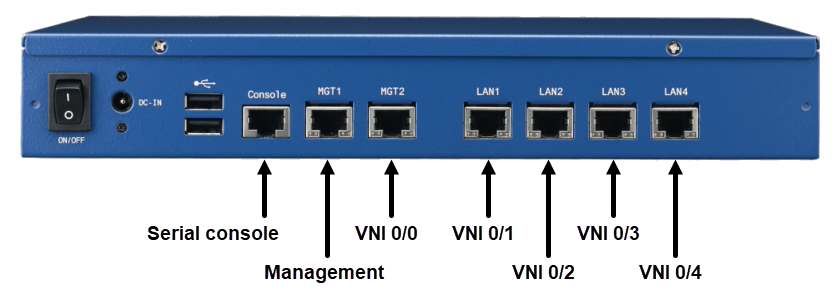
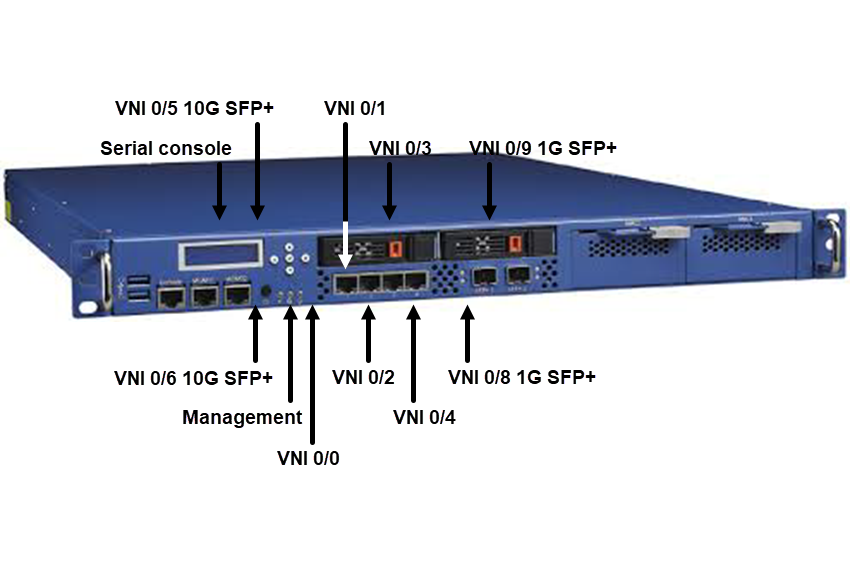
Ports on the Advantech FWA 1320
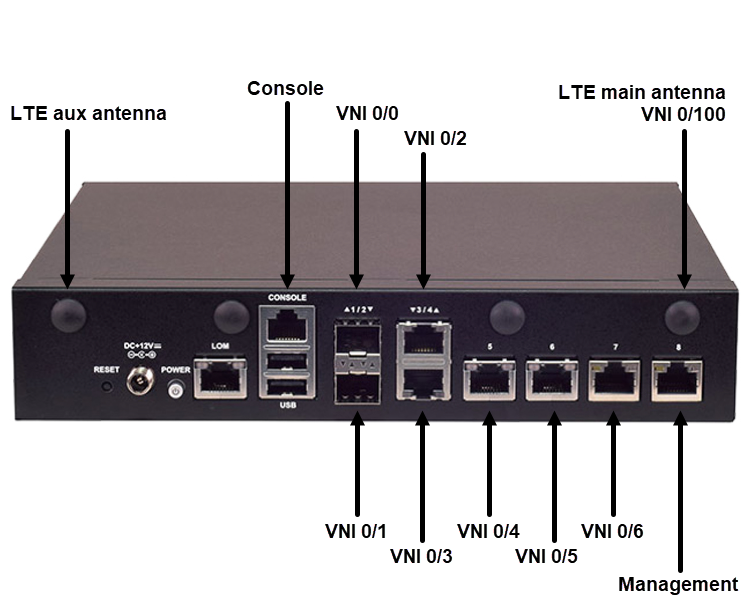
Ports on the Lanner Lanner NCA-1515B or Lanner NCA-1515A
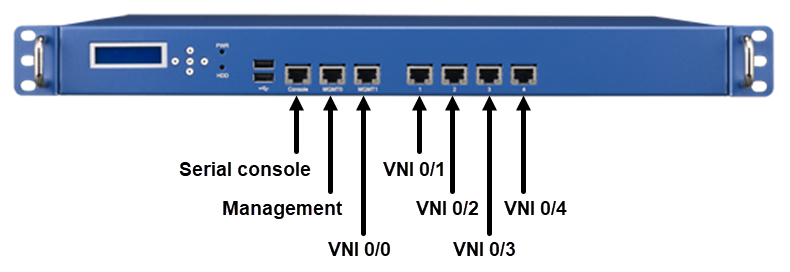
Ports on the Advantech FWA 2320
Ports on the Advantech FWA 3260
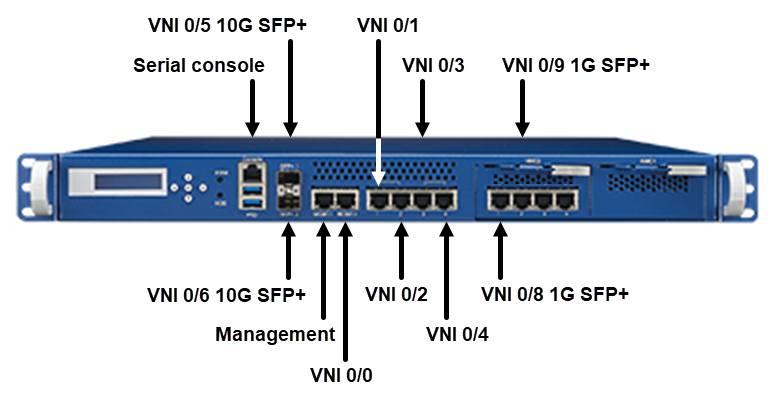
Ports on the Advantech FWA 5020
Step 2: Prepare to activate your service
To help ensure we stay on track and successfully design and activate your SD-WAN network, we recommend you do the following:
- Attend the design call to review the proposed design and desired topology and establish the implementation plan. (It's important to define primary sites (hub) that you need us to activate first.)
- Provide an overview of the WAN design—including (but not limited to) routing internet egress, VoIP, QoS, data-center failover, and circuit-failover requirements.
- Review and approve the network diagrams created by your sales engineer.
- Provide requested information about your network LAN and WAN designs at each site—including (but not limited to) WAN circuits, LAN routing. and VLAN assignments.
- Complete the technical workbook with your technical design engineer (TDE) to capture design and configuration data for each site—including (but not limited to) IP addressing, etc. If you are activating a virtual instance, this data will include details pertaining to your AWS or Azure cloud environment where the virtual instance resides.
- Develop site acceptance test plans and checklists.
- Provide requested information for site contacts for shipping and event notification.
- Make sure any transport services you're providing are ready.
Step 3: Activate your services
Your SD-WAN project manager monitors the progress of your order. Once we have indicated the order to be installation complete, we will contact you to schedule the days and times for installing your equipment and activating your service. Once confirmation of internal resource availability has been received with approval to schedule, we will communicate the final date/time of your activation call.
Before the day your service is activated, we'll contact your local contact to confirm the date/time of your activation. If you need to change the reserved activation date/time, contact your SD-WAN PM immediately to reschedule. If you have to cancel or reschedule within 24 hours of the scheduled activation start time, you may be charged.
If you requested an after-hours or weekend activation call and a Lumen contact doesn't attend, please contact your SD-WAN PM.
Use the information below to understand the installation and activation and what responsibilities you (and your on-site content) have beofre these scheduled events.
To help ensure a successful activation, you should
- Ensure circuit is extended to where the SD-WAN equipment will be located at the site
- Configure any hardware you're providing with the applicable speed and duplex (not auto-negotiate)
- Confirm your hardware is set up and ready to be connected to the Lumen network
- Identify you have enough space and power and are ready for us to install equipment
- If you are activating a virtual instance, confirm the AWS or Azure environment is established and ready for software activation.
While we're installing your managed SD-WAN equipment (before the scheduled activation call), please make on-site contact is ready for the following:
- You are not required to join a conference bridge during the equipment installation process.
- You must arrange and confirm site access for the Lumen field technician.
- Your local site contact must have knowledge of your server/data room location.
- Your local site contact must also have knowledge of rack space reserved for Lumen SD-WAN equipment.
- While the Lumen field technician will have the demarcation information from the LEC’s records, your local site contact must have knowledge of the location of the Lumen circuit.
- You will need to provide adequate/necessary power to support Lumen SD-WAN equipment.
- After Lumen installs your SD-WAN equipment your SD-WAN PM sends you an IP configuration letter.
After we install your SD-WAN equipment, we'll schedule your activation call (a conference call between you and Lumen). We will activate your service by following these steps:
- Verify connectivity.
- Prepare your on-site contact to access the console.
- Ensure LAN block is being routed correctly.
- Establish routing protocols.
- Confirm service with Lumen.
- Verify connectivity to other locations.
Production support
If you recently activated your service and can't pass any traffic, please contact your SD-WAN PM to engage the SD-WAN Activation team for help.
If you have activated your service but are experiencing issues after passing traffic for at least 12 hours, please contact Lumen SD-WAN Support:
- Services contracted in North America: 877-453-8353, option 1, then 2, then 4, then 2
- Services contracted in EMEA:
- +44 800 5283 848 (UK Toll Free)
- +800 5336 3273 (International Toll Free)
Billing start date for SD-WAN customers
If we are simply adding sites to your existing network, we will start billing after activating each site.
If we are installing a new network, we will start billing once we have activated two sites, with at least one active transport service connected to the SD-WAN equipment. (Note: If you have a preference which two sites we activate first, please contact your SD-WAN PM.)
In both instances, we will send you a connection email confirming that we've started billing you for your service.
Troubleshooting common problems
To help you quickly resolve a service issue, we recommend that you double-check these items before calling Lumen for support. Here are a list of common causes for not being pass traffic successfully.
- Verify power is correctly connected to your equipment by cycling the power (turning off and then back on).
- Confirm cabling is installed correctly by simply unplugging the cable and plugging it back in.
- Confirm the current state of equipment interface is in an ‘up’ state. The interface setting must match the Lumen configuration speed and duplex.
- Validate that the customer-provided, or local exchange carrier (LEC) circuit is working as ordered. Ensure that you can confirm power to the LEC devices. If there appears to be power and still no service, please obtain the LEC circuit ID before contacting Lumen Support.
- Confirm that the internal routing is configured correctly.
- Verify that your class of service (CoS) has been configured.
- Verify you’re not exceeding port capacity as ordered. If you have Ethernet service(s), it is usually necessary to ensure traffic shaping (or packet shaping) is enabled on the router. Contact your Lumen representative for additional capacity.
- If you are experiencing an impairment involving packet loss or routing, trace routes, source and destination pings are necessary for Lumen to assist in resolving the issue.
- To verify your quality of service (QoS), you may use these Lumen provided speed tests.
Please note that speed testing an off-network circuit is not a reliable indication of QoS. This testing should not be confused with class of service (CoS) testing.
North American test link: speedcenter.level3.net/
Customer not ready policy
We work hard to deliver your service with your cooperation as of the customer commitment date (CCD). If your delay or inaction prevents us from installing your service, we will begin charging for the service(s) starting on the customer commitment date. Service charges will continue to accrue until you're ready and Lumen can complete service installation. Accrued service charges will appear on your first invoice. If you have any questions about any site readiness or other actions you need to complete so we can meet the CCD and assure you are ready, please contact your SD-WAN PM as soon as possible.
Additionally, communicating important information to your site technical contact as soon as possible will help identify and address any issues ahead of time. Our goal is to work with you to achieve and exceptional delivery experience.
Customer cancellation policy
Lumen will confirm the specified scheduled date and time of the requested managed activation submitted by the SD-WAN PM on your behalf. Lumen Scheduling emails a confirmation of the scheduled managed activation date to you, to your CCM, and to the remote managed activation technician. The field technician who will install your equipment also receives a copy. Lumen also makes every effort to remind you of the upcoming scheduled managed activation date and time.
Below are the cancellation options:
- You must cancel one business day before the confirmed managed activation date and time. If it is within one business day, the cancelation will result in a charge (see below).
- You will have the option to cancel or rescheduled your managed activation without charges one business day before the confirmed activation date by calling your SD-WAN PM.
Portal training and self-help tools
- For help using Lumen Connect, access our support library.
- For help using the Versa Director portal, access our on SD-WAN with Versa Networks support content. You can also access additional materials, videos, and training options in the Versa Academy.
- For additional questions, contact your SD-WAN project manager or technical design engineer for in-progress deployments, open a repair ticket in Lumen Connect, or contact us:
- Services contracted in North America: 877-453-8353, option 1, then 2, then 4, then 2
- Services contracted in EMEA:
- +44 800 5283 848 (UK Toll Free)
- +800 533 63273 (International Toll Free)
- Services contracted in North America: 877-453-8353, option 1, then 2, then 4, then 2



