Get ready for Lumen® SD‑WAN with Cisco Meraki
As we set up your SD-WAN service, use this guide to follow the process step by step and to know where we'll need your help.
After you place your order, we may contact you to confirm a few details such as
- LAN and WAN interface IPs
- firewall features (URL Filtering, IPS)
- LAN routing
- any other IPSEC tunnels to non-SD WAN devices
Once you confirm the technical data, we configure your SD-WAN device and ship it to the location where the device will be installed (unless otherwise specified). We'll send the tracking numbers for this shipment to you by email.
Step 1: Install and turn on your device
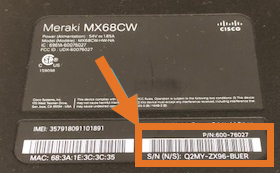
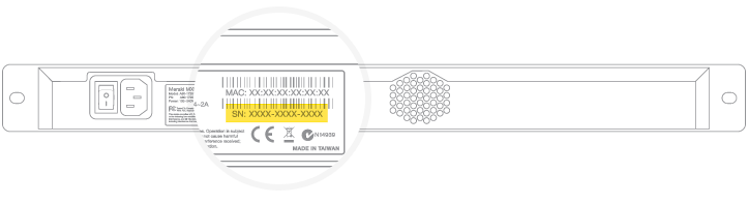
Before you install your device(s), make sure you record the serial number for each. You can find the serial number on the bottom of the device. This is the quickest way for your support member to find your information.
- Unpack the SD-WAN device(s) from the shipping box.
- If applicable, mount the device to the rack.
- Turn on the SD-WAN device.
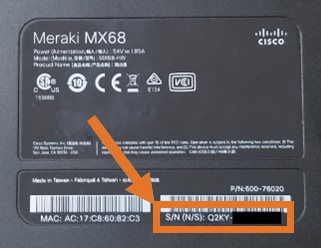
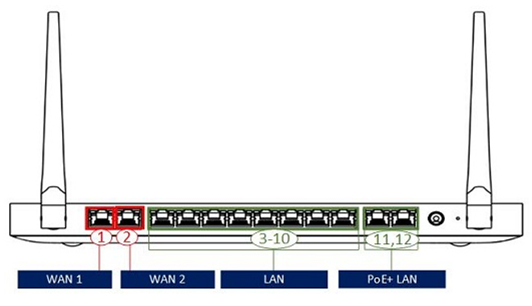
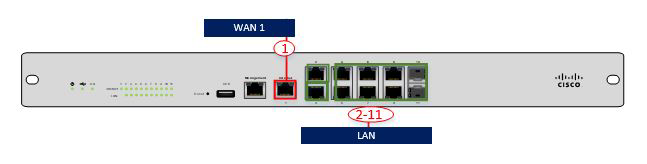
Ports on the Meraki MX100 (using a single WAN port--internet only)
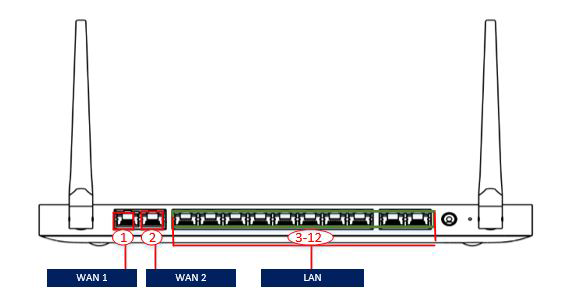
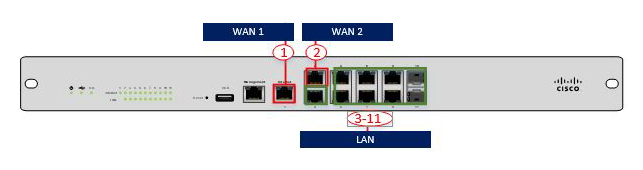
Ports on the Meraki MX100 (using a two WAN ports: internet and LTE, internet and internet)
Step 2: Connect your device to the network
Based on the type of internet you purchased, do one or both of the following:
- If your internet service is already active, connect your internet connection to SD-WAN device into one of the WAN ports. If you need help finding the right port, use the diagrams in step 1. (Otherwise, we'll have connect during the activation call.)
- If your device includes cellular internet access, the embedded SIM should automatically connect to the LTE network. The status indicator should turn solid purple indicating that the device is fully operational, connected, and that the uplink is actively using integrated cellular. When the LTE is not enabled, the status indicator will be white.
Step 3: Activate your service
We will contact you to schedule a call to activate your service. (To activate your service, we may need to verify the serial number of the device.)
During the activation call, your Lumen engineer
- Validates the configuration has been downloaded to the device.
- Validates that traffic can be passed between the devices.
- Completes a test plan to confirm successful activation and checks that the site-installation technician has completed their work.
If you have any questions during the initial installation, please contact our support team at 877-453-8353, option 3, then 4 and tell them you're a Lumen SD-WAN with Cisco Meraki customer.
Get help after activating your service
After the installation is complete, if you have any questions, configuration requests, or issues, call us: 877-453-8353, option 1.



