Toggle Navigation Toggle Navigation
  • Lumen Connect overview
  • Getting started/General
  • Services
  • APIs
  • Monitoring & Reports
  • Billing
  • Admin
  • Support
  • Orders (Wholesale)
  • Other portals overview
  • Media portal
  • DDoS Mitigation & Reporting
  • Security Solutions portal
  • VoIP portal
  • View all product support
  • Infrastructure
  • Connectivity
  • Security
  • Communication
  • Media & Entertainment
  • LSR portal
  • Port Out Request tool
  • Virtual Front Office
  • Readiness overview
  • Product-specific readiness
  • Handbooks
  • All infrastructure services
  • Edge Bare Metal
  • Edge Gateway
  • Edge Private Cloud
  • Encrypted Wavelength Service
  • Network Storage
  • All connectivity services
  • Ethernet On-Demand
  • Fiber+ Internet
  • Internet On-Demand
  • IP VPN On-Demand
  • NaaS Port
  • On-Demand services
  • Troubleshooting tools
  • All security services
  • Adaptive Network Security
  • Adaptive Threat Intelligence
  • Application Delivery Solutions
  • DDoS Hyper
  • DDoS Mitigation Service
  • Lumen Defender Powered by Black Lotus Labs
  • Lumen SASE with Fortinet
  • Lumen SASE with Versa
  • Lumen SASE with VMware
  • Network-based Security
  • SD-WAN with Cisco Meraki
  • SD-WAN with Versa Networks
  • Security Log Monitoring
  • All communication services
  • Cloud Voice
  • Hosted VoIP
  • Local Inbound (LI)
  • Lumen Solutions for Microsoft Teams
  • Lumen Solutions for Webex
  • Lumen Solutions for Zoom
  • Lumen Solutions for Zoom for Government
  • SIP Trunking
  • Unified Communications and Collaboration
  • Voice Complete
  • VoIP Enhanced Local (ELS)
  • VoIP services
  • Vyvx® Broadcast Solutions
  • North America
  • Asia Pacific (APAC)

Configuring your firewall for VoIP service

A firewall controls the incoming and outgoing network traffic based on an applied rule set and establishes a barrier between a trusted, secure LAN and/or WAN network(s) and the internet (not secure, nor trusted).


For Lumen® Hosted VoIP and Lumen® SIP Trunking, we recommend a LAN architecture where the voice traffic bypasses the firewall.
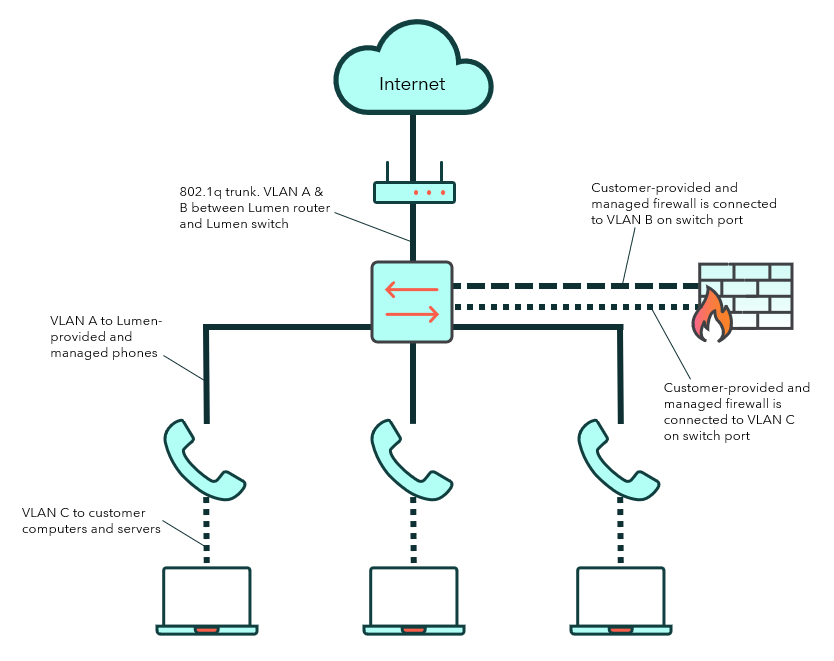
VoIP configuration diagram

If you configure a firewall feature, you must allow the following traffic to pass. The IP address of the Lumen session border controller (SBC) varies and can be provided by the provisioner working the order.


The following must be allowed between all Hosted VoIP phones and the Lumen SBC (in both directions):

  • Allow TCP/UDP ports 5060, 5061, and 5068 (for SIP)
  • Allow UDP ports 8500–59999 (for RTP)1
  • Allow UDP port 123 (for NTP)
  • Allow TCP port 80 (for HTTP)
  • Allow TCP port 2208 (for HTTP: Business Communicator)
  • Allow TCP port 443–450 (for HTTP)

1. Some firewalls will dynamically open and close UDP ports for RTP and control signaling as required and do not need the entire range of UDP ports for RTP opened all the time. If the firewall is configured to build dynamic lists based on traffic that originated inside the firewall then it is not necessary to perform any configuration on the firewall.
