

Get ready for equipment and service installation
We believe work is easier to manage when you know what to expect. If you follow the guidelines on this page, you will have done your part to help ensure your service is installed on time and to your satisfaction.
Successful service installation relies on you ensuring your site meets specific standards, described in this guide, before Lumen or an off-net provider can perform any installation work. The precise requirements for your project will be generated by a site survey either we or an off-net provider conduct. If any site improvements are required, it will benefit you to complete them as directed and as soon as possible.
To review the site-readiness guidelines, select the region where your service is being installed:
Wall-mount backboard or relay rack
Typically, the first step is to install a wall-mount backboard or relay rack. Plan to allow at least two weeks to order, ship, and install the equipment.
- The backboard should be 1.2m x 2.4m x 19mm (4’ x 8’ x ¾”) fire-rated plywood fastened to studs, and able to support 23 kg (50 lb).
- The backboard should be within 2m (6’) of a dedicated power outlet.
- The circuit must terminate within 6m (20’) of the wall-mounted equipment; the use of power strips and/or extension cords is not permitted.
- The equipment must be mounted no less than 1m (3’) from the floor and leave 25cm (-10”) clearance above.
- The relay rack should be 58cm wide x 2.1m tall (23” x 7’).
- Power and distances required for wall-mounted equipment also apply to rack-mounted equipment.
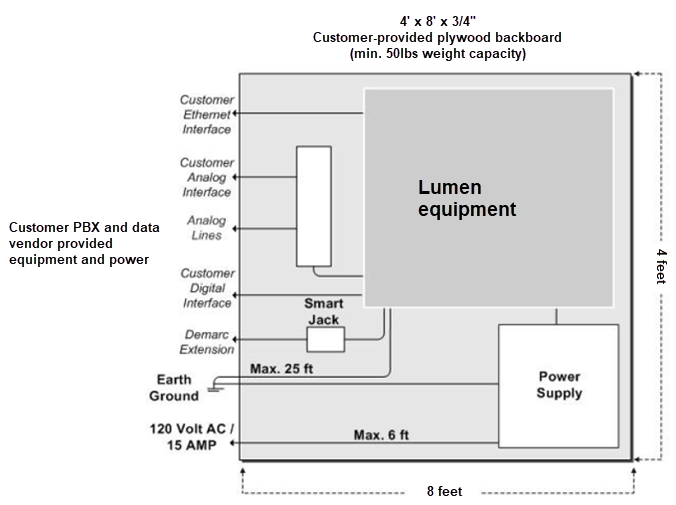
Power/ground
The work required to install the necessary power and ground can be completed simultaneously with wall-mount backboard or relay-rack installation. You may elect to hire an electrician to perform this work. In general, allow two weeks from your customer commit date (CCD) to complete any stand-alone power and ground work.
- The amperage, number and type of receptacles will be determined at the site survey
- Dedicated circuits backed up by UPS/generator systems are strongly recommended
- For AC power, 20A, 120V AC generator-backed, AC power is typically requested
- For DC power, if 48VDC, end user must provide +/- power leads with 2m (-6’) of slack wire coiled at the equipment location
- You must provide adequate grounding capability in the form of 19mm (¾”) metallic conduit from the equipment to an approved building ground
Grounding options listed in order of preference are: building service ground, main electric box, building steel, and, lastly, a metallic water pipe which is in direct contact with the earth for 10’ or more and electrically continuous to the point where the protector ground wire is installed; a bond must be placed around any meters.
Environmental conditions
You must maintain a suitable environment for network equipment operation:
| Environmental parameters | Suitable range |
| Operating temperature | 0–50°C / 32–120°F |
| Heat dissipation (BTU/hr) | 500 |
| Humidity | 10–85% (non‑condensing) |
Cable, cable path, and conduit
Cabling and cabling path can be completed simultaneously. Please allow approximately two weeks for completion. You may elect to hire an electrician to assist you. This work can be done concurrently with the wall-mount backboard/relay-rack, power, and ground installation.
- Provide inter-duct for floor-to-floor or suite-to-suite access.
- Common building telecom riser shafts should be used where available; you must perform any necessary core drilling or other premise preparation work.
- A clear path with conduit or cable tray needs to be provided from the manhole to the minimum point of entry(MPOE)/telecom room where the equipment will be placed (if applicable); this will apply for any on-net or off-net services requiring a transport component and a site survey.
- A site survey applies when either Lumen or the LEC is entering a building for the first time or is capacity constrained in a building.
Inside wiring: extending from the MPOE to your location
When a telecom service is provided to a commercial building, it is typically delivered to the minimum point of entry (MPOE)/telecom room. This demarcation point or “demarc” is generally the point at which you become responsible for the on-premise cabling and wiring. Depending on the building, the extension from the demarc to your equipment may be a substantial distance; therefore, it is important to investigate options early.
- For on-net services, Lumen can help you order/complete this extension for you. We may work with third-party vendors to complete the extension.
- For off-net services, the local provider does not typically extend the demarc; you need to manage completion of this work or hire a third party.
Your contract will specify inside wiring responsibilities and indicate whether Lumen will provide inside wiring service for an agreed-upon fee or that you will retain responsibility for ensuring the inside wiring satisfies service requirements. Please check with your building management, if applicable, as there may be guidelines in place allowing only a specific or preferred vendor to complete the demarc extension work.
Note: For each new service, a new demarc extension might be required. Please make sure to confirm demarc extensions for each service that you have ordered. Also, you will need to specifically confirm the point to which you want the service extended when requesting the demarc extension to be installed.
Network interface device readiness at your location
Lumen smart demarcation is a network interface device (NID) deployed at customer sites to provide end‑to‑end connectivity fault management and enables optional performance assurance with end‑to‑end SLAs. Additional fees may apply.
Lumen deploys NIDs for all off‑net Ethernet access to MPLS/IPVPN, EVPL, VPLS, and DIA circuits in North America.
Review the NID site preparation guide
- The NID is a device owned and installed by Lumen at your location.
- The NID is installed and maintained at your sites and Ethernet network‑to‑network interface (E‑NNIs); country limitations may apply.
Key capabilities
- Supports 10/100/1000Mbps at each of your locations
- Provides intelligent loop-back capabilities and an L2/L3 test traffic generator
- Enables optional EVPL and VPLS service features
- Performance assurance with end-to-end SLAs including frame delivery, frame delay (latency), and frame delay variation (jitter); performance summary data available using Lumen Connect (our customer portal), for EVPL and VPLS services only
- Traffic shaping to improve performance of sub-rate circuits
Smart demarcation overview
- Shows a clear demarcation between the providers’ (Lumen and LEC) and your networks to quickly isolate service problems
- Allows Lumen Operations teams to more effectively activate the Ethernet service and provide post-install service assurance
- Provides TDM-like maintenance and troubleshooting tools
- Enables SLA monitoring and end-to-end reporting, for EVPL and VPLS services only
Site preparation
To facilitate installation of the smart-demarcation device, please ensure:
- Access to the site for the installer at the scheduled installation time(s)
- Your appropriate personnel are on-site and available at the scheduled installation time(s)
- The following are ready: power distribution boxes, conduits, backboard or rack space for equipment mounting, grounding, surge and lighting protection. Associated hardware and power outlets are within 1m (3’) of the smart demarcation device installation location
- Inside wiring is in place, including extensions and any necessary building alterations, so the smart demarcation device can be installed within 2m (6’) of the local access demarcation
- The demarcation point for this installation is clearly marked to allow the installer to connect the correct circuit to the correct smart demarcation device interface
Managed and non-managed gear readiness at your location
Additional equipment may be required based upon your service. Please refer to the applicable activation guide for details.
Site readiness quick checklist
Use this checklist to help you get your site ready. If you have any questions about this checklist or site readiness in general, contact your customer care manager.
Power | |
My site has AC power with a three‑prong plug | |
My room has grounding available | |
My room has power available within 2m (~6’) of the area the Lumen equipment will be installed | |
I understand that power strips/extension cords cannot be used with Lumen equipment | |
Backboard | |
The equipment will be installed within 6m (20’) of the circuit termination | |
My room has a minimum of 1.2m x 2.4m (4’ x 8’) of backboard available, or available rack space. (If no, my room has wall space to mount a new backboard within the distance requirements.) | |
My equipment backboard is plywood and at least 19mm (¾”) thick | |
My equipment backboard can support at least 23kg (50lb) | |
Environmental | |
My room is broom clean | |
My room maintains a temperature range of between 0–50°C (32–120°F) | |
My room has a clear and safe access path to the area where the Lumen equipment will be installed | |
Inside Wiring | |
My inside wiring is complete | |
I would like Lumen to complete inside wiring (Contact your customer care manager for details) | |



