

Creating a trunk utilization report for Toll Free Service
For Lumen® Toll Free Service, trunk utilization reports provide use data and statistics for toll‑free numbers in near realtime. You can review your use by toll‑free number or terminating address, select from two reports:
- Statistical reports—use totals by toll‑free number on a monthly, weekly, daily, or hourly basis. This report shows a list of toll‑free numbers, followed by use information for each number.
- Ring‑to reports—use totals by terminating address on a monthly, weekly, daily, or hourly basis. This report shows a list of trunks and switched‑terminating addresses by toll‑free number, followed by use information.
To create a trunk utilization report:
- Using the left menu, click Monitoring, click Voice Reports, then click Toll Free.
Lumen Connect lists the toll-free reports you have access to.
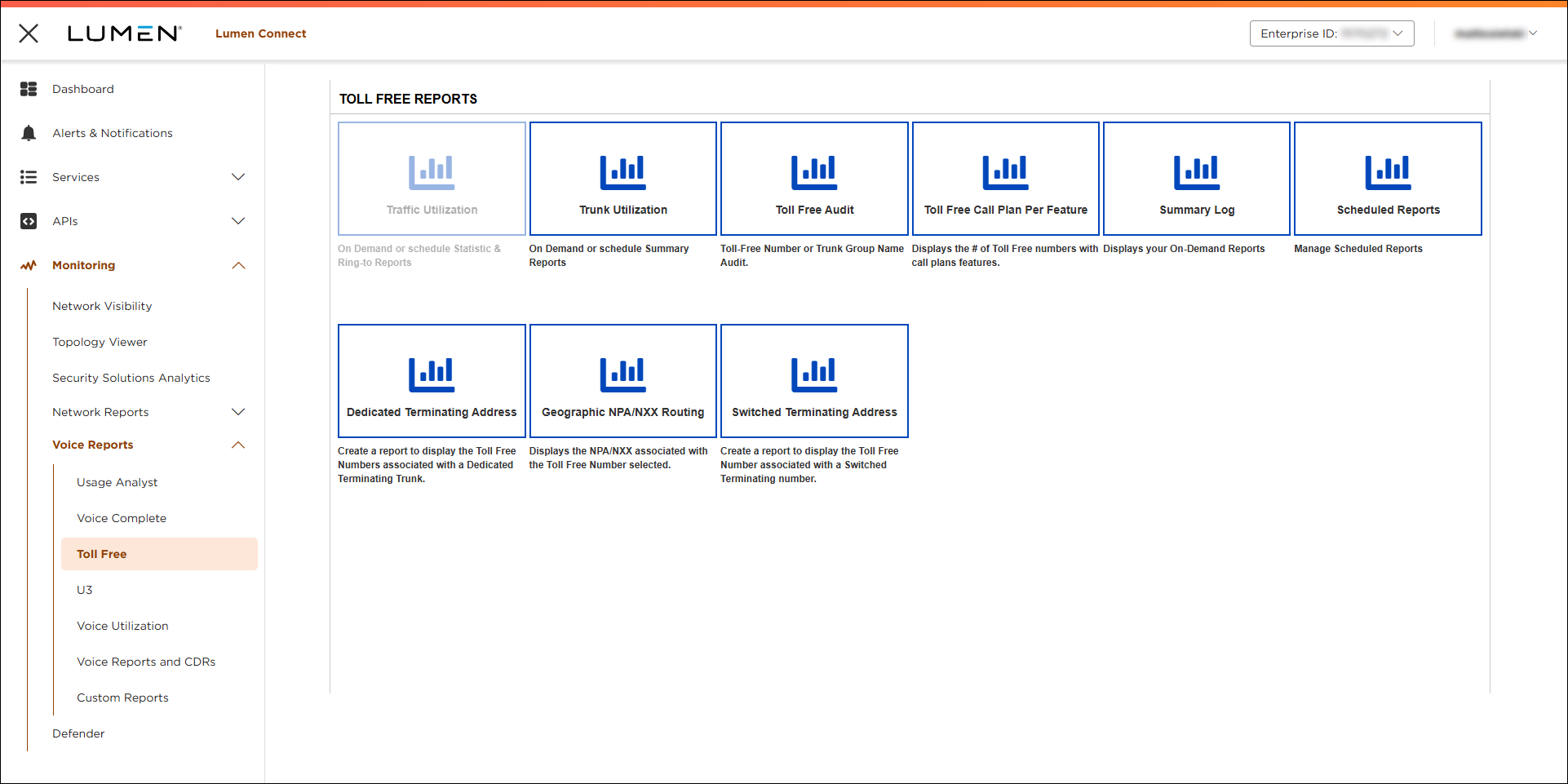
- Click Trunk Utilization.
- Select the radio button for the type of trunk utilization report you want to create:
- Daily—shows the data you select for each day in the report's date range.
- Hourly—shows the data you select for each one‑hour period in the report's date range.
- Monthly—shows the busy hour and blocked call data for the selected trunk group(s). For each month, in the selected time period, this report shows the busiest traffic hour, the date of the busiest hour, CCS information, and the total number of blocked calls.
- Busy Hour—shows the busiest hour of traffic each trunk group experienced over a specified date range. This report tells you how many calls traveled over each trunk and how many calls were blocked due to traffic volume. It also includes recommendations for total channels needed to handle peak traffic loads.
- Daily—shows the data you select for each day in the report's date range.
Based on the type of report you select, Lumen Connect shows options for the report.
- Select how you want the report set up, then click Run.
Lumen Connect builds the report. Based on the report type, use the table below to better understand the data in the report.
Field/button/term | Descriptions |
|---|---|
Blocked Calls | Total calls that were blocked for each listed item. |
Busy Hour | Hour the largest call volume traveled across the trunk for each listed item. |
Busy Hour CCS | Centum Call Seconds that traveled over the trunk during the busiest hour for each listed item. |
Busy Hour Date | Day of the year each listed item's busiest hour occurred. |
CCS | Monthly use in Centum Call Seconds. The value is calculated by taking the trunk's minutes of use (MOU) and multiplying it by 0.6. |
Centum Call Seconds (CCS) Units | One Centum Call Second represents one circuit busy for 100 seconds. |
Comment | Notes added to the report when it was created. |
Date | Day of the year the use for each listed item occurred. |
Day of Week | Day of the week the use for each listed item occurred. |
Inbound Attempt | Total calls that attempted to use each trunk in an inbound direction. |
Inbound CCS | Total inbound use carried by all selected trunks, in CCS units. |
Inbound CCS per Trunk | Total inbound use carried by each trunk, in CCS units. |
Inbound Complete | Total calls that successfully used each trunk in an inbound direction. |
Inbound MOU | Total inbound use carried by all selected trunks, in MOU units. |
Inbound MOU per Trunk | Total inbound use carried by each trunk, in MOU units. |
Inbound Overflow | Total calls that attempted to use the trunk in an inbound direction and failed. |
Minutes of Use (MOU) Units | Represents one circuit busy for 60 seconds. |
Month | Month the use for each listed item occurred. |
Outbound Attempt | Total calls that attempted to use each trunk in an outbound direction. |
Outbound CCS | Total outbound use carried by all selected trunks, in CCS units. |
Outbound CCS per Trunk | Total outbound use carried by each trunk, in CCS units. |
Outbound Complete | Total calls that successfully used each trunk in an outbound direction. |
Outbound MOU | Total outbound use carried by all selected trunks, in MOU units. |
Outbound MOU per Trunk | Total outbound use carried by each trunk, in MOU units. |
Outbound Overflow | Total calls that attempted to use the trunk in an outbound direction and failed. |
Percent Blocking | Percentage of calls that failed. |
Report Name | Name assigned to the report when it was created. |
Report Title | Title assigned to the report when it was created. |
Total CCS | Total inbound and outbound use carried by all selected trunks, in CCS units. |
Total CCS per Trunk | Total inbound and outbound use carried by each trunk, in CCS units. |
Total MOU | Total inbound and outbound use carried by all selected trunks, in MOU units. |
Total MOU per Trunk | Total inbound and outbound usage carried by each trunk, in MOU units. |
Total Overflow | Total calls that attempted to use selected trunks and failed. |
Trunk Group | Unique identifier for each trunk group listed in the report. |
Trunks In Service | Total selected trunks that were fully functional during the specified time period. |
Trunks Out of Service | Total selected trunks that were down during the specified time period. |



