

Forwarding calls (VVX 3xx/4xx series)
You can turn on forwarding to have all your incoming calls ring to another phone number that you specify or use the feature to redirect an incoming call to someone else.
Note: If you forward your phone to a number that is outside of your local calling area, long distance charges may apply. If the the person doesn't answer, callers are sent to voicemail.
Forwarding calls while the phone is ringing
If your phone is ringing and you want to direct the call to someone else, you can redirect the call without answering it.
To forward calls while the phone is ringing:
- Press the Forward soft key.
- Enter the number you want to forward the call to.
- Press the Forward soft key.
Forwarding all calls to another number/person
You can set up your phone to forward all calls to another number, even if the Do Not Disturb feature is on.
To forward calls to another number:
- Press the Forward soft key.
- If your phone has multiple lines, select the line you want to forward.
- Select the forwarding option from the forwarding type screen:
- always—to forward all incoming calls
- no answer—forward all unanswered incoming calls and specify the number of rings (we recommend three)
- busy—forward incoming calls if your line is busy
- always—to forward all incoming calls
- Enter the number you want to forward calls to, then press the Enable soft key.
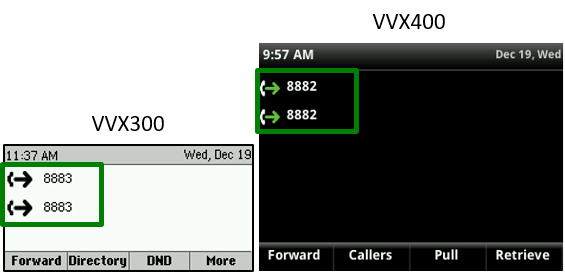
The forwarding number displays in the status bar at the top of the phone screen. If the phone is idle, the forwarding icon also appears as a green arrow pointing to your extension.
Turning forwarding off
When you no longer need to forward your calls, you can disable forwarding to resume normal calling.
To turn forwarding off:
- Press the Forward soft key.
- If your phone has multiple lines, select the line you want to disable forwarding.
- Select the forwarding option from the forwarding type screen.
- Press the Disable soft key.
After forwarding is turned off, calls resume ringing to your desk phone.



