

Making calls on your phone (VVX 50x/60x series)
You can make a call in several ways:
- lift the handset, then dial
- press the Headset or Speakerphone button, then dial
- tap an available line key, then dial
- use home view
Making a call from home view
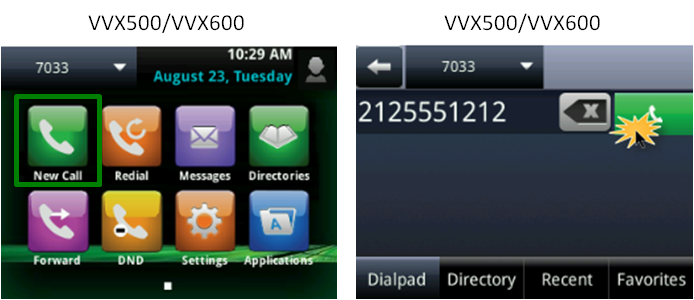
To make a call from home view:
- Press the Home button (to the right of your screen) and all home view options display.
- Tap the New Call soft key.
- Using the keypad, enter the extension or 10-digit number you want to dial.
Note: If you enter a number incorrectly, tap the X icon to delete the incorrect number, then enter the correct number.
- Place your call by doing one of the following:
- Tap the green handset icon.
- Lift the handset.
- Press the Headset or Speakerphone button.
- Tap the green handset icon.
Disconnecting from a call
You can end/disconnect your call by doing one of the following:
- Return the handset to the cradle.
- Tap the End Call soft key.
- Press the Headset or Speakerphone button (if using either).



