Moving calls from your mobile phone to desk phone (VVX 50x/60x series)
If you make a call using the Anywhere feature from your mobile phone, you can continue your call when you return to the office. For the Anywhere feature to work, you need to set up your designated mobile phone as your anywhere phone, in the VoIP portal. You can also move a call from your desk phone to your mobile phone.
Note: Anywhere is a feature only available with premium seats. If you don't find the Anywhere feature in the VoIP portal, you don't have access to the feature. Contact your organization's administrator to find out if you can get access to this feature.
Making a call from your Anywhere mobile phone
If you're away from your office and need to make a call, and don't want your clients to know your mobile number, you can call them using the Anywhere pilot number. Using this number also allows you to pull an active call from your mobile phone to your desk phone to continue your conversation. You can find your Anywhere pilot number in the end-user portal.
To make a call using your Anywhere pilot number:
- From your mobile phone, dial the Anywhere pilot number (save this number as a contact or speed dial in your mobile phone for easy access).
- When prompted for the destination digits, dial the number for the person you're calling.
The person sees the caller ID of your desk phone, and not the caller ID from you mobile phone.
Moving a call from your Anywhere mobile device to your desk phone
If you're on an active call on your Anywhere mobile phone, and you used the Anywhere pilot number, you can move your active call to your desk phone.
To move an active call from your mobile phone to your desk phone:
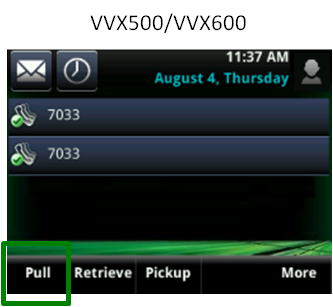
- Tap the Pull soft key on your desk phone.
- Continue your call from your desk phone.