Transferring calls (VVX 3xx/4xx series)
The transfer feature allows you to send calls to individuals within or outside of your office. You can transfer calls in two ways: consultative or blind. If you want to speak with the person you're transferring to, use the consultative transfer option. If you prefer to not announce the call before transferring, use the blind transfer option.
Note: Your organization's administrator sets the default transfer type. Generally, the consultative option is programmed as the default transfer method. You can change the default transfer setting.
Using the Consultative transfer
The consultative transfer is usually the default transfer option on your phone.
To announce a call before a transfer:
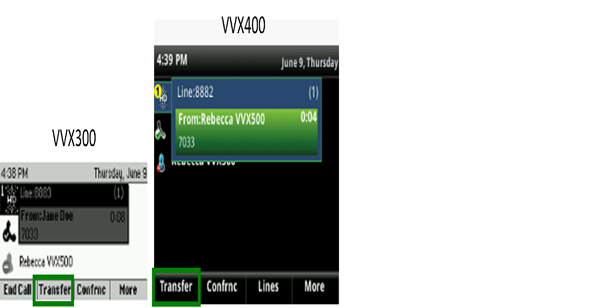
- With a call in progress, press the Transfer soft key or Transfer button (located to the left of your keypad).
- On your keypad, enter the extension followed by the # key (or the 10-digit phone number).
- When the person answers, announce the caller.
- Press the Transfer soft key or Transfer button again and the call releases from your phone.
- If the person is unable to take the call, or rolls to voicemail, press the Cancel soft key to return to the caller. (You may need to press the More soft key to access the Cancel soft key.)
Using the blind transfer
To transfer a call without announcing the caller (blind transfer):
- With a call in progress, press the Transfer soft key or Transfer button (located to the left of your keypad).
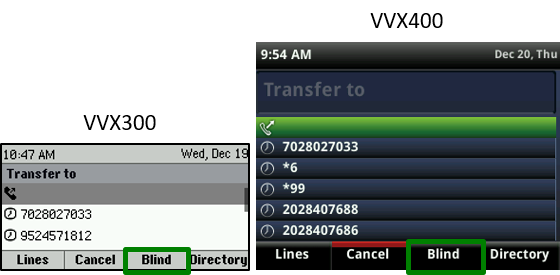
- Press the Blind soft key.
- On your keypad, enter the extension followed by the # key (or the 10-digit phone number).
Your transfer is complete. If the person does not answer the transfer, the caller will go to voicemail or follow another call treatment or forwarding path.