

Exploring the Contact Center Supervisor Client
After you sign in to the Contact Center Supervisor Client, the main page appears. Here, you’ll do most of your monitoring and queue-management activities. It also provides links to other pages and windows where you access reports and your dashboard.
Contact Center agent? Explore the Contact Center Agent Client
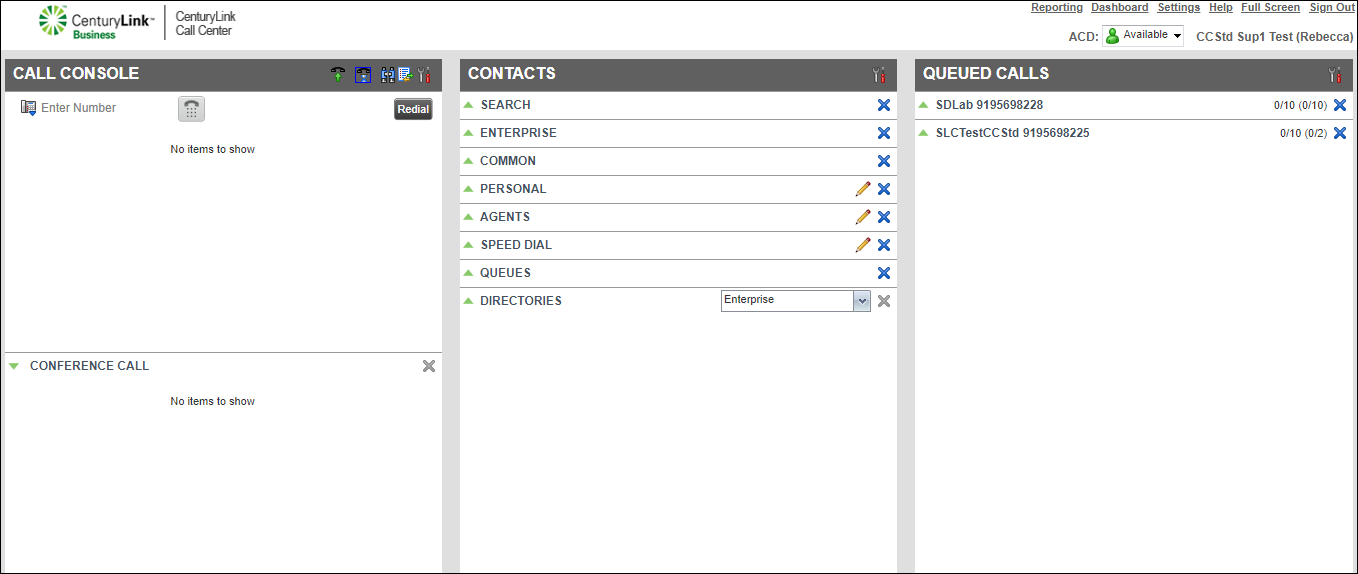
The main page has three sections and a menu:
The Contacts pane contains your directories (enterprise, queues, personal, speed dial, and agents). From the Contacts pane you can look for a contact, call a contact, and edit a contact record in your personal and speed dial directory. If you need to call a contact, but don’t know the contact’s phone number, use the search feature. In your personal and speed dial directories you can add or delete contacts and manage your speed dial numbers. If you want to see some or all of the queues assigned to you, in your queues directory, select what queues show in the directory.
On the Contacts pane header bar, click the Options icon to select the directories you want to display in the Contacts pane. You can also manage how names display by first or last name in the enterprise directory using the sort feature, and sort agents by their ACD status.
In the Agents list, supervisors can monitor an agent’s ACD status, change an agent’s ACD status, call the agent, and make an agent a member of a queue from the Agent’s list.
Use the Queued Calls pane to select the queues you want to monitor, and which queues you want to see in the pane. Each queue’s calls and statistics are displayed with the queue’s name and primary phone number. When you expand the queue’s listing, you’ll see a list of all the queue’s calls. By default, calls are listed with the oldest call first. You can group and order queued calls by a specific priority such as calls waiting to be answered, caller’s ID name (if available) and phone number, or call time (including time in the current queue).
Using the Queued Calls pane, you can transfer calls to another queue or agent, and change the position of a call in a queue.



